Drivers often need to find EV charging stations efficiently. Locating a reliable electric vehicle charging station is a key part of EV ownership. Drivers can use dedicated apps, in-car navigation, or general mapping tools. The right EV-Ladegerät depends on the driver’s immediate needs. Advanced EV-Ladelösungen from providers like TPSON improve the charging experience. Hersteller von EV-Ladegeräten are expanding the network of electric car charging stations. Even tragbare EV-Ladegeräte offer flexibility for drivers on the go.
Method 1: Use Dedicated Apps to Find EV Charging Stations
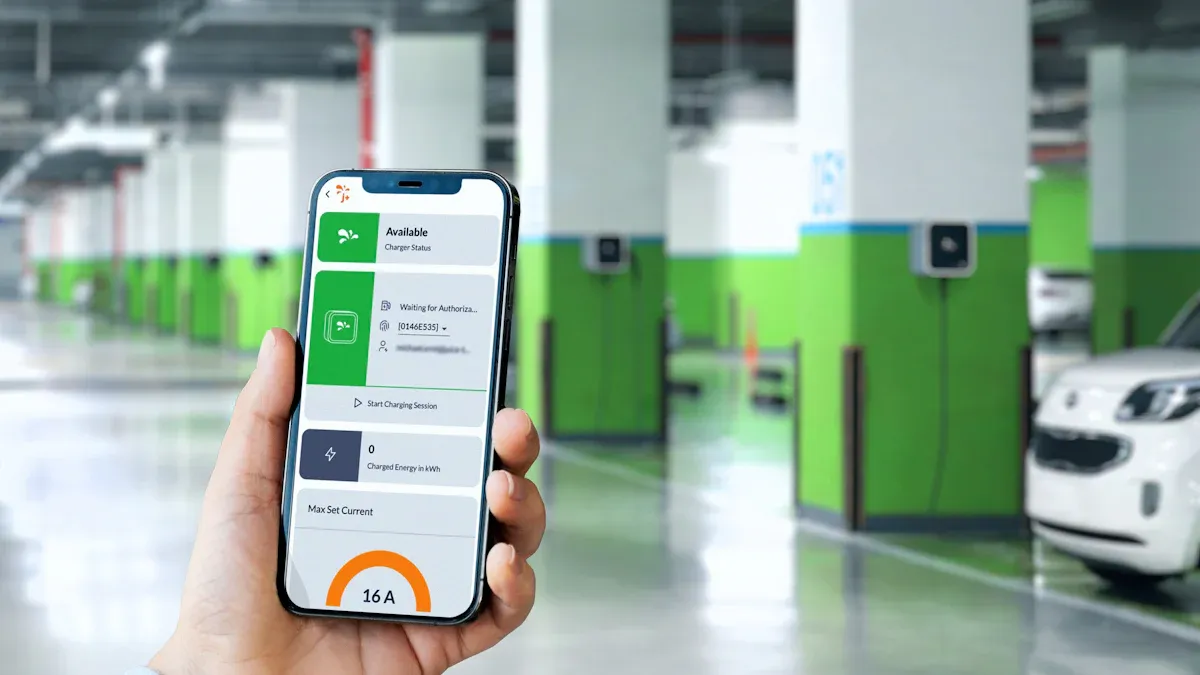
Dedicated mobile applications are the most powerful resource for EV drivers looking to find EV charging stations. While advanced solutions from providers like TPSON enhance the hardware experience, apps provide the real-time data needed to navigate the public charging landscape effectively. They consolidate information from numerous networks into a single, user-friendly interface.
Why Apps Are Your Best Tool
Apps offer a significant advantage over other methods by providing dynamic, crowd-sourced information that helps drivers make informed decisions before they even start their journey.
Access Real-Time Availability
A primary source of driver frustration is arriving at a charger only to find it occupied or out of order. Research shows that a lack of real-time data contributes to “Gebührenangst.” Apps directly address this by displaying which stations are currently in use, available, or offline. This feature is critical for reliability, as users often report chargers that disconnect frequently or fail to deliver their advertised speeds. Real-time status updates help drivers avoid these problematic locations.
Read Comprehensive User Reviews
Apps provide a “human touch” that static maps cannot. Drivers can leave recent check-ins, comments, and photos. This user-generated content is invaluable for confirming a charger’s functionality. A quick look at recent reviews can reveal if a station is blocked by another vehicle, broken, or located in a hard-to-access area. Users also share helpful tips about nearby amenities like coffee shops or restrooms.
How to Use PlugShare
PlugShare is a comprehensive, crowd-sourced app that functions as an international charging stations map.
Searching and Filtering
Drivers begin by allowing the app to see their location. They can then filter the map to show only compatible chargers. Key filters include:
- Plug Type: (e.g., CCS, NACS, J1772)
- Aufladegeschwindigkeit: (Level 2 or DC Fast Charging)
- Netzwerk: (e.g., Electrify America, EVgo)
Checking Station Status
Each station pin on the map is color-coded for status. Green indicates availability, while gray signifies it is offline or broken. Tapping a station reveals detailed information, including recent user check-ins, photos, and comments, which provide the most reliable picture of its current condition.
How to Use ChargePoint
ChargePoint operates one of the largest charging networks and its app is essential for accessing its stations.
Finding and Activating a Charger
The ChargePoint app allows a driver to easily find a charging station near you. Once at the station, the driver can start a session in several ways:
- Tippen Sie zum Aufladen: Hold the phone over the station’s reader.
- In-App Activation: Select the station in the app and press the “Start Charge” button.
Other Notable Charging Apps While PlugShare and ChargePoint are leaders, other excellent apps serve specific needs or regions:
- Motorhaube: Offers subscription plans that work across multiple charging networks.
- Zap-Map: Provides comprehensive coverage for drivers in the UK and Republic of Ireland.
- A Better Routeplanner (ABRP): Specializes in detailed journey planning with charging stops.
Managing Payments
The app securely stores a user’s payment information. It handles all billing automatically, eliminating the need for physical credit cards at the charger. Users can also view their complete charging history, track expenses, and receive push notifications when their charging session is complete.
Method 2: Use Your EV’s In-Car Navigation

Many modern electric vehicles come equipped with sophisticated navigation systems designed specifically for EV travel. These built-in tools offer a level of convenience and integration that third-party apps cannot match, turning the car itself into a smart trip-planning assistant.
The Convenience of Built-In Systems
The primary advantage of in-car navigation is its direct connection to the vehicle’s core systems. This deep integration provides real-time data and automated functions that simplify the charging process.
Seamless Vehicle Integration
An EV’s navigation system communicates directly with its battery management system (BMS). This allows it to provide highly accurate range predictions based on current battery level, driving style, and terrain. The system can proactively suggest charging stops when it determines the vehicle cannot reach its destination. This software intelligence works in harmony with technologically advanced hardware, such as charging solutions from TPSON, to create a reliable and user-friendly ecosystem.
Automatic Battery Preconditioning
One of the most significant benefits of using in-car navigation is automatic battery preconditioning. When a driver sets a DC fast charger as a destination, the vehicle automatically begins to heat or cool its battery pack. Arriving with the battery at an optimal temperature allows it to accept a charge at the fastest possible rate, significantly reducing wait times.
How to Find the Nearest EV Charging Station
Locating a charger using the car’s interface is a straightforward process designed for minimal driver distraction. The system can find chargers on demand or incorporate them into a longer journey.
Searching on Your Car’s Screen
Drivers can manually search for chargers at any time. For example, a Tesla driver can find the nearest EV charging station with a few simple steps:
- Enter a destination into the navigation system.
- The car automatically alerts the driver if a charge is needed to complete the trip.
- To find a charger proactively, the driver accesses the main menu.
- They instruct the navigation to locate the nearest compatible charger.
- The system then updates the route to guide the driver to the selected station.
Adding a Charger to Your Route
For long-distance travel, the vehicle’s trip planner is an invaluable tool. After a driver inputs a final destination, the system automatically calculates a route that includes all necessary charging stops. It displays the required charging time at each location to ensure the vehicle has enough energy to reach the next stop or the final destination. This feature makes planning road trips with multiple ev charging stations nearly effortless.
Profi-Tipp: While the car’s navigation is excellent for routing, drivers should still use a dedicated app like PlugShare to check recent user reviews for a selected station. This helps confirm the charger is operational before they commit to driving there.
Method 3: Use Google Maps for EV Charging Stations
Google Maps is a familiar tool for millions of drivers worldwide. Its powerful mapping and navigation capabilities now extend to electric vehicle owners. The platform provides a convenient way to locate chargers without needing to switch between different applications for simple trips. Using Google Maps for EV charging stations integrates this essential task into a driver’s existing navigation habits.
Searching for Chargers in Google Maps
Finding a charger is as simple as searching for any other point of interest. The app uses straightforward commands and integrates with voice assistants for a hands-free experience.
Basic Search Commands
A driver can find nearby chargers by typing simple phrases into the search bar. Searching for EV-Ladestationen will populate the charging stations map with available locations. For more specific results, a user can refine the search by selecting the option to add plugs. This action ensures the results are suitable for the vehicle’s specific charging port, showing only compatible options.
Voice Search Integration
For enhanced safety and convenience, drivers can use voice commands. Activating Google Assistant and saying, “Find EV chargers near me,” initiates a search without requiring manual input. This hands-free functionality allows drivers to keep their focus on the road while locating their next charging stop.
Using Filters for Your EV
To make Google Maps truly effective, drivers should configure their EV settings. This one-time setup personalizes the app to the driver’s specific vehicle, saving time on every subsequent search. This software customization complements advanced hardware, like charging solutions from TPSON, creating a fully integrated and efficient charging ecosystem.
Filtering by Plug Type
Setting up plug filters ensures that Google Maps only shows chargers a vehicle can actually use. This eliminates the frustration of navigating to an incompatible station. A driver can configure this in the settings menu.
- Go to ‘Settings’ within the Google Maps app.
- Select the ‘Electric vehicle settings’ option.
- Choose ‘Add plugs’ to see a list of connector types.
- Select the specific plugs the EV uses (e.g., J1772, CCS, CHAdeMO, NACS).
Once saved, all future searches will automatically filter for these plug types.
Checking for Real-Time Availability
Google Maps displays real-time availability for many charging networks. Pins on the map show how many ports are available versus how many are currently in use. This information helps drivers avoid waiting in line.
Anmerkung: While Google’s real-time data is helpful, it may not be as up-to-the-minute as data from dedicated charging apps. For critical charging stops on a long journey, a driver might cross-reference the station’s status in an app like PlugShare for added confidence.
Planning a Road Trip with Your EV
Long-distance travel in an electric vehicle requires thoughtful planning. Fortunately, powerful digital tools can automate most of the work. Drivers can use their car’s built-in navigation or a specialized third-party app to create a reliable itinerary. These systems ensure a driver can reach their destination with minimal stress and optimal efficiency.
Using Your Car’s Trip Planner
Most modern EVs feature a native trip planner integrated directly into the navigation system. This tool is the most convenient option for planning on the fly. It leverages real-time vehicle data to provide accurate and dynamic routing.
Automatic Route Planning
An EV’s trip planner simplifies long journeys. A driver enters a destination. The system then plots the entire drive. It automatically suggests charging stops if the battery’s current state of charge is insufficient. Advanced systems, like the integrated Google Maps in Polestar vehicles, check the battery level and plan a route that optimizes for the fastest total arrival time. The planner considers several factors:
- The specific car model and its efficiency.
- The route’s elevation changes.
- The estimated weight from passengers or cargo.
Understanding Charging Stop Predictions
The trip planner provides more than just locations. It also estimates the required charging duration at each stop. These predictions are crucial for time management. However, drivers should know that external conditions can affect these estimates. For example, a study showed that high temperatures can reduce an EV’s range by nearly 20%. The system may dynamically adjust its suggestions based on real-time energy consumption, ensuring the plan remains viable throughout the journey.
Using A Better Routeplanner (ABRP)
For meticulous planning, A Better Routeplanner (ABRP) is the gold standard. This specialized application offers a level of detail and customization that surpasses most built-in systems. It is an essential tool for drivers who want maximum control over their journey.
Setting Up Your Vehicle Profile
The power of ABRP begins with a detailed vehicle profile. A driver selects their exact EV model from an extensive database. They can then input specific details about their car’s efficiency and battery health. This precise setup allows ABRP to perform comprehensive route calculations that account for elevation, speed, and other variables. This detailed software planning, combined with technologically advanced hardware from providers like TPSON, creates a seamless and reliable charging ecosystem.
Customizing Your Route Plan
ABRP allows drivers to fine-tune every aspect of their trip. Users can set preferences for specific charging networks or prioritize stations with amenities. The premium version even incorporates real-time weather and traffic data into its calculations. This level of control helps drivers create a journey that perfectly matches their needs.
Pro Tip for Efficiency 💡
Drivers should pre-condition their vehicle’s cabin while it is still plugged in before a trip. This action uses power from the grid, not the battery, preserving precious range for the road ahead.
Understanding Charger Types and Speeds
Navigating the world of EV charging requires understanding the different charger types and speeds available. Not all chargers are created equal. Knowing the difference between charging levels and plug types ensures a driver can select the right station for their vehicle and time constraints. This knowledge empowers EV owners to charge efficiently, whether at home or on the road.
Erklärungen zu den Ladestufen
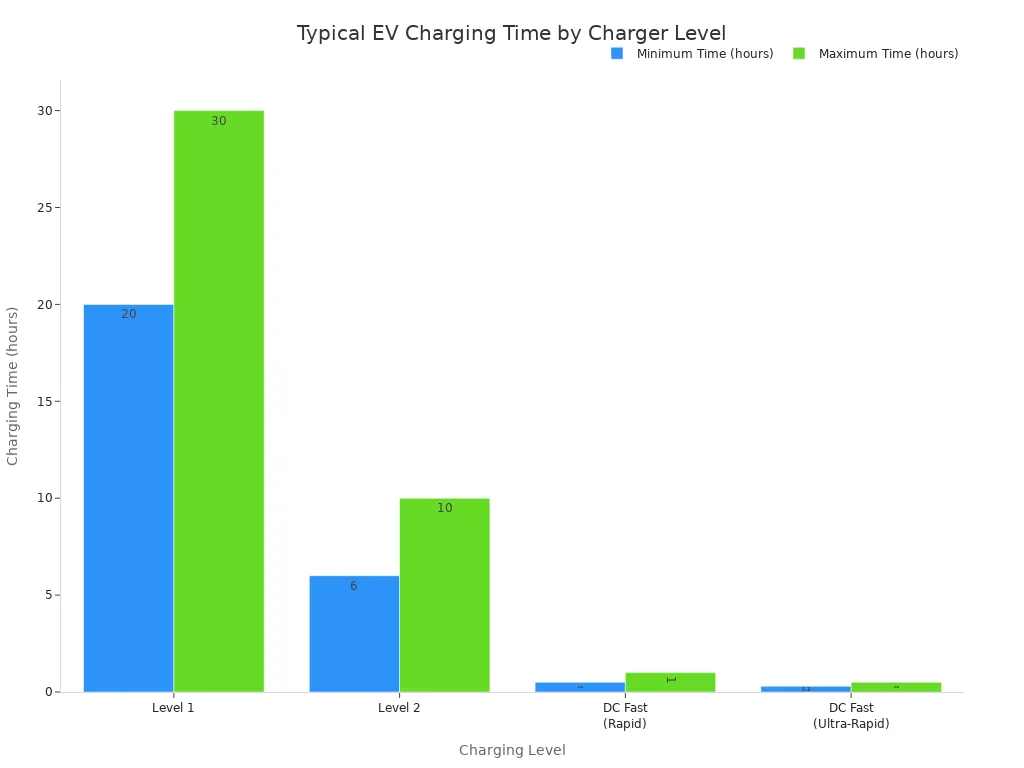
Charging speed is categorized into three main levels. Each level corresponds to a different power output, which directly impacts how quickly an EV’s battery can be refilled.
Stufe 1: Langsame Aufladung über Nacht
Level 1 charging uses a standard 120-volt household outlet. It is the slowest method, adding only a few miles of range per hour. This option is most practical for plug-in hybrid vehicles (PHEVs) or for EV drivers who have short daily commutes. A full charge on a larger EV battery can take over 24 hours, making it a supplementary rather than primary charging solution.
Level 2: The All-Purpose Charger
Level 2 is the most common and practical charging level for daily use. These chargers operate at 240 volts and are found in homes, workplaces, and public locations like shopping centers. A Level 2 charger can typically replenish an EV battery in 4 to 10 hours, making it perfect for overnight charging. Technologically advanced providers like TPSON offer robust Level 2 charging solutions for both residential and commercial applications.
DC Fast Charging: The Fastest Option
DC Fast Charging is the key to convenient long-distance travel. These powerful stations can charge a battery from 10% to 80% in as little as 20 to 60 minutes. Unlike Level 1 and 2, which use Alternating Current (AC), these chargers supply Direct Current (DC) straight to the battery. This bypasses the car’s onboard converter, allowing for significantly faster speeds.
Common Plug Types in North America
In addition to different speeds, chargers use different physical connectors. A driver must use a station with a plug that matches their vehicle’s port.
J1772 (Level 2)
The J1772 is the universal standard plug for Level 1 and Level 2 AC charging across North America. Nearly every non-Tesla EV uses this connector for home and public AC charging.
CCS (DC Fast Charging)
The Combined Charging System (CCS) plug adds two large pins below the standard J1772 connector. This “combo” design allows a single port to accept both Level 2 AC and DC fast charging. It has been the legacy standard for most non-Tesla EVs.
NACS (Tesla)
The North American Charging Standard (NACS) was developed by Tesla. This sleek, compact plug handles both AC and DC charging through the same pins. Due to its ergonomic design and the reliability of the Supercharger network, NACS is rapidly becoming the dominant standard in North America, with most major automakers adopting it for future models.
| Merkmal | CCS (Kombiniertes Ladesystem) | NACS (Nordamerikanischer Ladestandard) |
|---|---|---|
| Physical Design | Large, two-part connector. | Small, sleek, single-piece connector. |
| Ergonomics | Heavier and more cumbersome. | Lightweight and easier to handle. |
| AC & DC Charging | Uses separate sections for AC and DC. | Uses the same pins for both AC and DC. |
| Vehicle Port Size | Larger footprint on the vehicle. | Smaller and more discreet vehicle port. |
CHAdeMO
CHAdeMO is another DC fast-charging standard, primarily used by some Asian automakers like Nissan. While still available at many charging locations, it is being phased out in North America in favor of CCS and NACS on newer vehicle models.
Navigating Public Charging Networks
Understanding the landscape of public charging networks is essential for any EV driver. Several major companies operate thousands of stations, each with its own app, pricing structure, and user experience. A driver’s ability to find a public charging station near you often depends on which networks are prominent in their area.
Major Charging Providers
Four providers dominate the public charging scene in North America. Each offers a distinct network of chargers accessible to a growing number of EV models.
Amerika elektrifizieren
Electrify America operates a robust network focused on high-speed DC fast charging. This makes it a popular choice for drivers on long road trips. The network is expanding rapidly and, as of late 2024, included more than 1,000 charging stations across North America. Its stations are often located in the parking lots of large retail centers.
EVgo
EVgo is another major player, with a strong presence in urban and suburban areas. The company partners with businesses like grocery stores and shopping malls to install chargers in convenient locations. This strategy helps drivers integrate charging into their daily routines.
ChargePoint
ChargePoint operates one of the largest and most extensive networks. Its model is unique because it includes both company-owned stations and stations owned by independent businesses that use ChargePoint’s software and hardware. This vast, interconnected system allows a driver to find a charging station near you and activate it through a single app.
Tesla Supercharger Network
The Tesla Supercharger network is widely praised for its reliability and seamless user experience. Historically exclusive to Tesla vehicles, the network is gradually opening up to other EV brands. This expansion gives more drivers access to one of the most dependable charging infrastructures available.
Payment and Memberships
Drivers have several options for paying at public charging stations. The best choice depends on how frequently a person uses public chargers.
Pay-As-You-Go vs. Subscriptions
Most networks offer both a pay-as-you-go option and a monthly subscription plan. Subscriptions typically provide lower per-kWh rates in exchange for a monthly fee, making them cost-effective for frequent users.
| Payment Model | Am besten für | Key Advantage |
|---|---|---|
| Umlageverfahren | Infrequent users | No commitment; pay only for what you use. |
| Abonnement | Frequent users | Lower charging rates and potential perks. |
Using Roaming Agreements
Roaming agreements are partnerships between different charging networks. They allow a driver to use one network’s app and account to pay for a session at a partner network’s station. This simplifies the process, as drivers do not need to sign up for every single service. These software integrations complement the advanced hardware from providers like TPSON, creating a more unified and user-friendly charging ecosystem.
Quick Tips for a Smooth Charging Experience
A successful public charging session involves more than just finding a station. A driver can ensure a hassle-free experience by adopting a few key habits. These practices help avoid common frustrations and contribute to a better charging environment for everyone.
Always Check Recent Reviews
Dedicated charging apps provide invaluable, up-to-the-minute information from other EV drivers. A driver should always consult recent user check-ins before navigating to a station. This simple step can save significant time and prevent a wasted trip.
Spotting Unreliable Stations
User reviews often highlight recurring problems that indicate an unreliable station. A driver should be cautious if they see reports of frequent charging interruptions or payment system failures. Physical signs of a faulty unit are also red flags.
Warning Signs of a Faulty Charger 🚩
- Visible damage like frayed cables or cracked connectors.
- Error messages or a completely dark screen on the unit.
- Reports of charging speeds that are much slower than advertised.
- Communication failures between the charger and the vehicle.
Confirming Charger Functionality
A station might appear available on a map but be non-functional in reality. Recent user comments provide the most accurate picture. Drivers leave feedback about specific issues that a driver cannot see from afar. These issues often include:
- Broken payment card readers.
- Glitchy mobile apps that fail to start a session.
- Chargers that are offline despite appearing active on the network.
Reading these comments helps a driver confirm that a charger is truly operational before they commit to the journey.
Basic Charging Etiquette
Public charging is a shared resource. Following a few simple rules of etiquette ensures the network remains efficient and accessible for all drivers. Good manners make the charging experience better for the entire EV community.
Besetzen Sie nicht unnötig einen Platz
A charging bay is for active charging, not for parking. One of the most frustrating experiences for an EV driver is finding a needed charger occupied by a fully charged vehicle. A driver should move their car as soon as it has a sufficient charge. For DC fast chargers, it is common practice to unplug and move on after reaching an 80% charge, as charging speeds slow considerably beyond that point. This frees up the fast charger for others who need a quick top-up.
Keep the Area Tidy
A tidy charging station is a functional one. After finishing a session, a driver should return the charging cable to its holder. This action prevents the cable and connector from being damaged by weather or other vehicles. Leaving the area clean and the equipment properly stowed ensures the station is ready and safe for the next person.
The most reliable strategy combines a dedicated app like PlugShare for detailed data with the car’s navigation for convenience. A driver ensures stress-free travel by adopting a few essential habits.
- Plan routes in advance to identify charging points.
- Check recent user reviews to confirm station functionality.
- Keep a backup charging app ready for unexpected issues.
Mastering these tools allows a driver to navigate the network of ev charging stations confidently, knowing a reliable charge is always within reach.
FAQ
What is the fastest way to charge an EV?
DC Fast Charging is the quickest method available. It can replenish most of an EV’s battery in under an hour, making it ideal for road trips. Level 2 charging is slower and better suited for overnight use at home or work.
Kann ich jedes öffentliche Ladegerät für mein E-Fahrzeug benutzen?
No. A driver must find a station with a plug that matches their vehicle’s charging port. Drivers can use apps to filter for compatible plug types like CCS or NACS, ensuring they navigate to a usable charger.
Was soll ich tun, wenn ein Ladegerät kaputt ist?
A driver should report the faulty unit through their charging app. This action warns other users. They can then use the app’s map to find the nearest ev charging station that is confirmed to be working by recent user reviews.
Wie hoch sind die Kosten für öffentliche Gebühren?
Charging costs vary significantly. Networks set their own prices, often based on location and time. Drivers can choose a pay-as-you-go option or a monthly subscription, which usually offers lower rates for frequent users.
What is battery preconditioning?
Battery preconditioning is an automated vehicle function. The car heats or cools its battery to an optimal temperature when a driver navigates to a DC fast charger. This process allows the battery to accept a much faster charging speed upon arrival.
Are home chargers different from public ones?
Ja. Home chargers are typically Level 1 or Level 2 AC units. Public infrastructure includes Level 2 chargers and much faster DC Fast Chargers. Technologically advanced providers like TPSON offer reliable Level 2 charging solutions for residential installation.
What is charging etiquette? 🧐
Proper etiquette ensures a good experience for everyone. Key rules include:
- Moving your vehicle once it is sufficiently charged.
- Not blocking a charging spot if you are not charging.
- Returning the cable neatly to its holder after use.